When we talk about application security, we often focus on authentication, authorization, API security, encryption, and protecting the frontend. But there is one layer that deserves just as much attention: the database. Your application can have perfect authentication and carefully designed APIs, but if an attacker can directly reach your database server, you have created a much bigger problem. From my experience working with backend systems and cloud infrastructure, one principle has become very clear: your database should not be publicly accessible unless there is an extremely specific reason for it. The application should be the gateway to the database, not the internet.
1. Why Database Security Matters
A database usually contains some of the most valuable information in an application, including user information, password hashes, business data, API credentials, and operational data. If an attacker gets direct access to the database, the consequences can be much worse than compromising a single API endpoint. They may be able to:
- Read sensitive data or modify and delete records.
- Create unauthorized users and extract credentials or tokens.
- Damage production data or perform destructive operations.
- Use the database as a starting point for attacking other internal services.
2. Approach One: VPC Networking
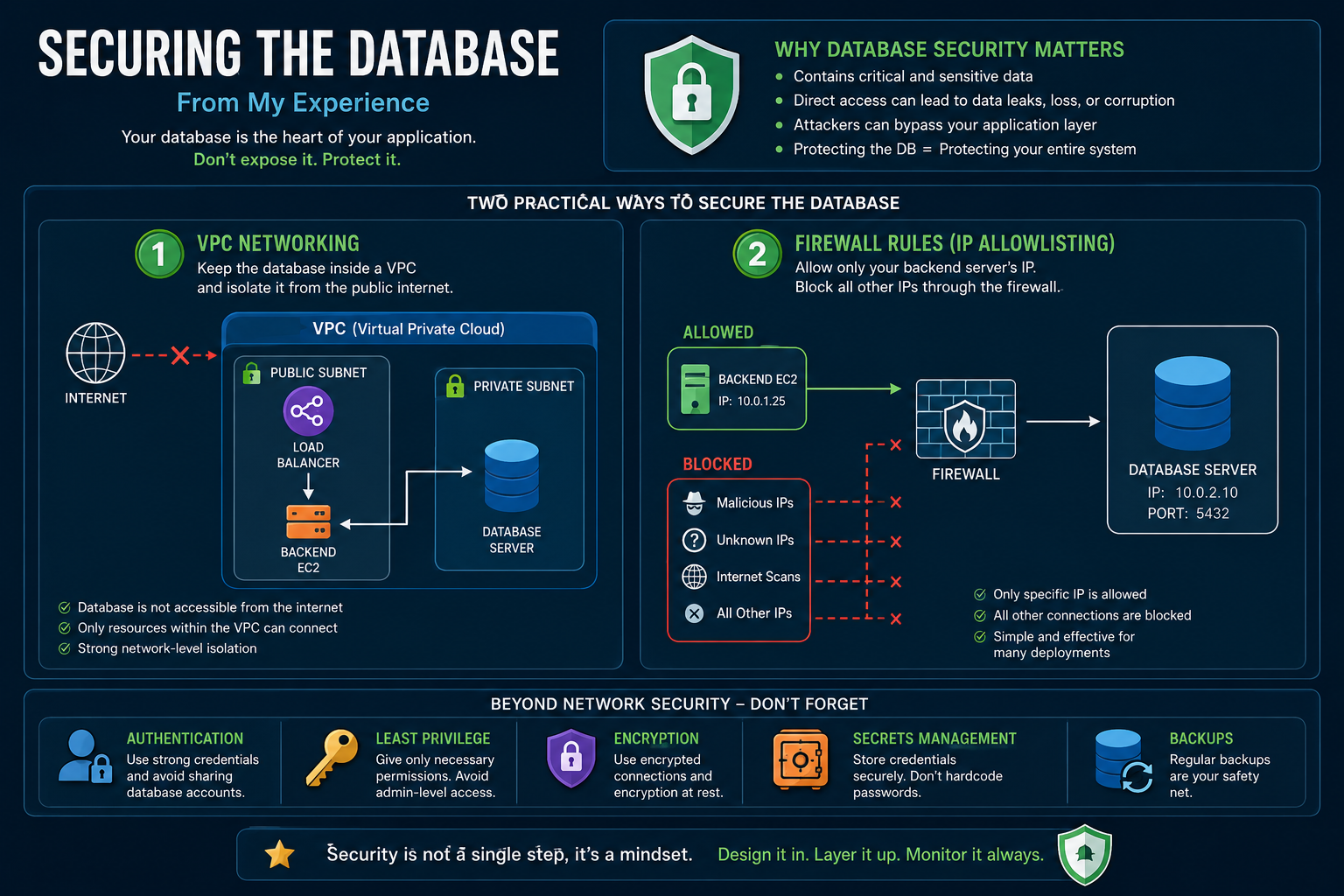
One of the cleanest approaches is to place the database inside a Virtual Private Cloud (VPC) and make it accessible only from trusted resources within that network. The backend communicates with the database through the private network, while the internet hits a load balancer. The biggest advantage is network-level isolation.
- Even if someone discovers the database's private IP or domain, they cannot reach it from the public internet.
- The database effectively lives behind multiple layers of network controls.
- You can configure security groups, routing rules, subnet rules, and firewall policies to control exactly which resources can communicate with the database.
- Instead of saying 'The database is protected because we have a strong password', you can say 'The database isn't even reachable by unauthorized networks'. That is a much stronger security boundary.
3. Approach Two: Strict Firewall Rules
Another practical approach for simpler infrastructure is to protect the database using strict firewall rules. The idea is straightforward: only allow the backend server to connect to the database. For example, if your backend EC2 instance is at 10.0.1.25 and your PostgreSQL database is at 10.0.2.10:5432, you explicitly ALLOW the backend IP and DENY everything else.
- Even if someone scans the server, the database port will not be openly available to them.
- The backend becomes the only trusted source of database connections.
- The firewall becomes the first line of defense, blocking internet traffic outright.
4. VPC vs. Firewall & What to Avoid
These approaches are not competitors. In a production environment, you can and often should use both for defense in depth. The VPC provides network isolation, the firewall provides traffic-level control, and the database provides authentication. One configuration I would strongly avoid is opening the database port to 0.0.0.0/0 just because it is convenient during development. Temporary configurations have a habit of becoming permanent.
- Use VPN access for secure remote management.
- Use SSH tunneling or Bastion hosts for developer access.
- Rely on private networking and cloud-managed database access mechanisms.
- Utilize temporary firewall allowlisting instead of opening ports globally.
5. Security Is More Than Networking
One important lesson I have learned is that network security alone is not enough. Even if the database is inside a private VPC, you still need to think about internal application layers and operational safety.
- Authentication: Use strong database credentials and avoid sharing one database account across everything.
- Least Privilege: Your application only needs SELECT, INSERT, UPDATE, and DELETE. It probably does not need permission to DROP DATABASE or ALTER SYSTEM.
- Encryption: Use encrypted connections between the application and database, and consider encryption at rest for sensitive production data.
- Secrets Management: Do not put database passwords directly inside your source code. Use environment variables or a proper secrets management solution.
- Backups: A secure database without reliable backups can still become a serious production incident. Protect against accidental deletion, human mistakes, and infrastructure failures.
6. My Practical Rule for Database Architecture
When designing a backend system, I try to think about database access in a specific order to make security much easier to reason about.
- Step 1: Can the public internet reach the database? (The answer should be NO).
- Step 2: Which application or service needs access? (Allow only those services).
- Step 3: Can those services perform everything? (Apply least privilege).
- Step 4: Are credentials protected? (Use proper secret management).
- Step 5: Can we recover the data? (Implement backups and a recovery plan).
Summary
Database security does not have to start with complicated security products. Sometimes the biggest improvement comes from a very simple architectural decision: Do not expose the database to everyone. Put it behind a private network when possible, and use firewall rules to allow only trusted application servers. Then add authentication, authorization, encryption, secret management, monitoring, and backups on top of that. Security should be designed into the architecture, not added after the application is already running. Your backend needs access, and your developers may occasionally need controlled access. But the public internet? It probably does not need a seat at the table.